A 35-person manufacturer I worked with last year signed a Salesforce quote that looked reasonable on a per-seat basis. By the time the first invoice cleared, the number was 3.2 times the license line. Implementation, a full-copy sandbox, two integrations, extra API capacity, and a partner who billed by the hour will do that.
None of those costs were hidden. They were just spread across four documents and three meetings, which is its own kind of hiding. If you are shopping for Salesforce CRM, the license is the smallest part of the decision. The edition you choose and the scope you agree to matter far more.
What “Salesforce CRM” means now
Salesforce stopped being one product a long time ago. The company sells Sales Cloud, Service Cloud, Marketing Cloud, Commerce Cloud, Data Cloud, the Platform, and now a stack of AI products under the Agentforce name. Most mid-market buyers need Sales Cloud and a handful of adjacent features. The rest is a menu, and the menu is where budgets go to die.
For the rest of this article I am talking about Sales Cloud editions, because that is what most teams mean when they say “Salesforce CRM.”
The editions in plain English
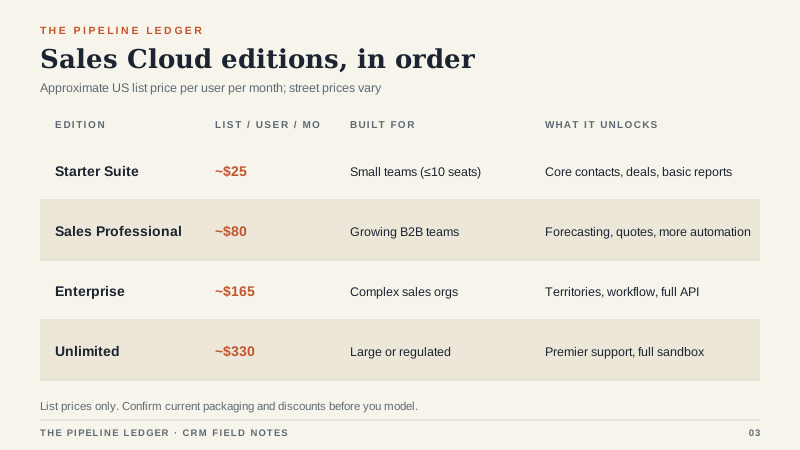
Starter Suite is aimed at small teams, roughly ten seats or fewer. It covers contacts, deals, basic email and calendar integration, and simple reporting. It is fine for a founder-led sales motion with one pipeline. It is not built for customization.
Sales Professional is the first edition most growing B2B teams consider. You get forecasting, quotes, more automation, and a better reporting layer. The catch is that Professional has meaningful API and customization limits. If you plan to integrate an ERP or build a custom quoting flow, check those limits before you sign.
Enterprise is where territories, advanced workflow, full API access, and more sandbox options live. Most 30-to-200-seat companies with a real sales process end up here. It is also where the list price starts to hurt.
Unlimited adds premier support, a full sandbox, and more storage. Unless you are large, regulated, or running a genuinely complex org, Unlimited is usually a want, not a need.
What the license really costs
List prices these days run from roughly $25 per user per month for Starter to roughly $330 for Unlimited. Sales Professional sits around $80 and Enterprise around $165. Those are list numbers, before discounts, and almost nobody pays list. A 30-seat deal with a three-year term commonly lands 10 to 30 percent below list, depending on timing, competition, and how much the sales team wants the logo on the quarter.
Three things move the number more than the discount rate:
- Seat count. Teams routinely buy seats for people who will log in once a month. Buy 80 percent of what you think you need and true up later. Salesforce would rather sell you more seats now, which is exactly why you should resist.
- Term and escalation. A three-year term usually buys a better discount, but check the annual uplift clause. A 5 to 7 percent escalator can eat the discount by year three.
- Edition. Moving from Professional to Enterprise can nearly double the per-seat price. Make sure the extra features are ones you will actually operate, not ones the demo made look easy.
Where the budget leaks
The license is visible. The leaks are not.
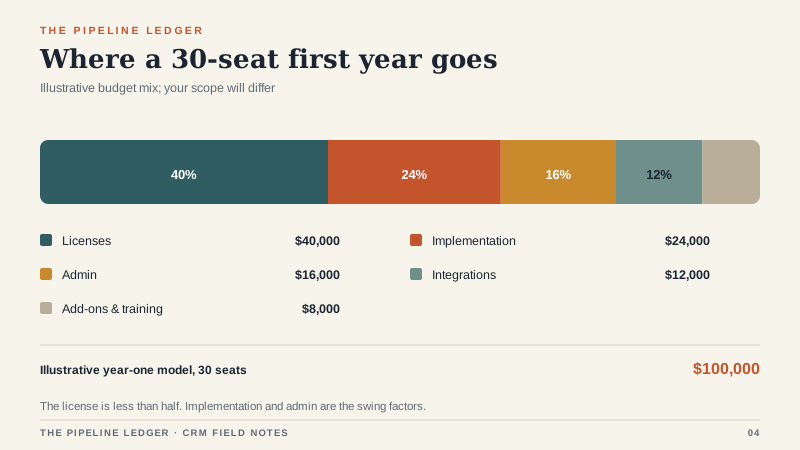
Implementation. A first build for a 30-seat team runs from about $15,000 for a focused partner project to well over $100,000 for a multi-cloud build with custom objects and integrations. The difference is scope, not competence. The best partner I have worked with was also the one who pushed back hardest on custom fields.
Data migration. Moving accounts, contacts, and open deals is one project. Cleaning them is another. Budget for the cleaning. If you skip it, you will pay for it later in duplicate records and bad reporting.
Integrations. Each meaningful connection to an ERP, quoting tool, phone system, or data warehouse tends to run $5,000 to $30,000, sometimes more. Middleware is its own line item. So is the person who owns the integration after launch.
Sandboxes. A full-copy sandbox is not included on every edition, and the add-on is not cheap. If your team makes changes without a safe place to test them, you will eventually learn why the sandbox existed.
Add-ons. CPQ, Shield, Data Cloud, extra storage, Agentforce credits. Salesforce’s product catalog is deep, and every add-on has a champion inside your company. Make the champion write the business case.
Admin capacity. A competent Salesforce admin costs $80,000 to $120,000 a year fully loaded, or roughly half of a person if you share the role. If you do not fund the role, the system decays quietly until someone schedules a rescue project.
When Salesforce is the wrong answer
Salesforce is a platform. Platforms reward teams that can operate them. If you do not have an admin, a documented process, and at least one person who enjoys building reports, you are buying a workshop without a carpenter.
I would look elsewhere if you are under ten users with a simple pipeline, if your budget for year one is under $15,000 all-in, if you need to be live in three weeks, or if your sales motion is so stable that customization is a cost rather than a benefit. A lighter CRM will do the three core jobs and cost a fraction as much. There is no prize for buying more platform than you can use. If you are still building the shortlist, my CRM software evaluation process is the place I would start.
That said, Salesforce earns its price in specific situations: multi-team territories, complex approval chains, deep integration requirements, and companies that will genuinely staff an admin function. The mistake is not buying Salesforce. The mistake is buying Enterprise because the demo felt smoother than the alternative.
How I would buy it
Start with Professional unless you can name the Enterprise features you will use in the first 90 days. Buy fewer seats than the vendor recommends, with a written true-up process. Negotiate a fixed-fee implementation with a defined scope and a change-order process. Ask for a ramp schedule if you are hiring reps over the year. Cap the annual uplift. Get the data export terms in writing. And ask what happens if you leave: who helps with the migration, and at what cost?
If you will be inheriting an existing instance rather than buying a new one, the work is different; I have written a separate guide to running an inherited SFDC org.
If you use a partner, ask for two references in your industry and one reference from a project that went badly. The last one tells you more than the first two. Every partner has a war story. The good ones will tell you theirs.
A 30-seat Professional deployment often lands between $60,000 and $120,000 in year one, all-in, depending on implementation scope and whether you count internal admin time. That is a real number. It can be worth it. Just do not let anyone sell it to you as “$80 a seat.”
The test I use before signing
Write down the three decisions this system must support: the forecast call, the pipeline review, and the renewal conversation. Then ask the vendor to show those three screens with your data, not their demo data. If the screens are clean and the data model is simple, you are probably buying the right thing. If the answer is “we can build that,” add 30 percent to the budget and three months to the timeline.
Salesforce is not overpriced for what it does. It is overbought. Buy the edition and the scope you can operate, and the platform will do what the brochure promised.
